Leads stop getting lost between messengers and a spreadsheet
One came in through Instagram DMs, another on WhatsApp, a third stayed in a manager's head, and by evening nobody can say who hasn't had a reply.
The CRM gathers enquiries from ads, forms and messengers onto one board: you can see every lead, its status and who is responsible for it.
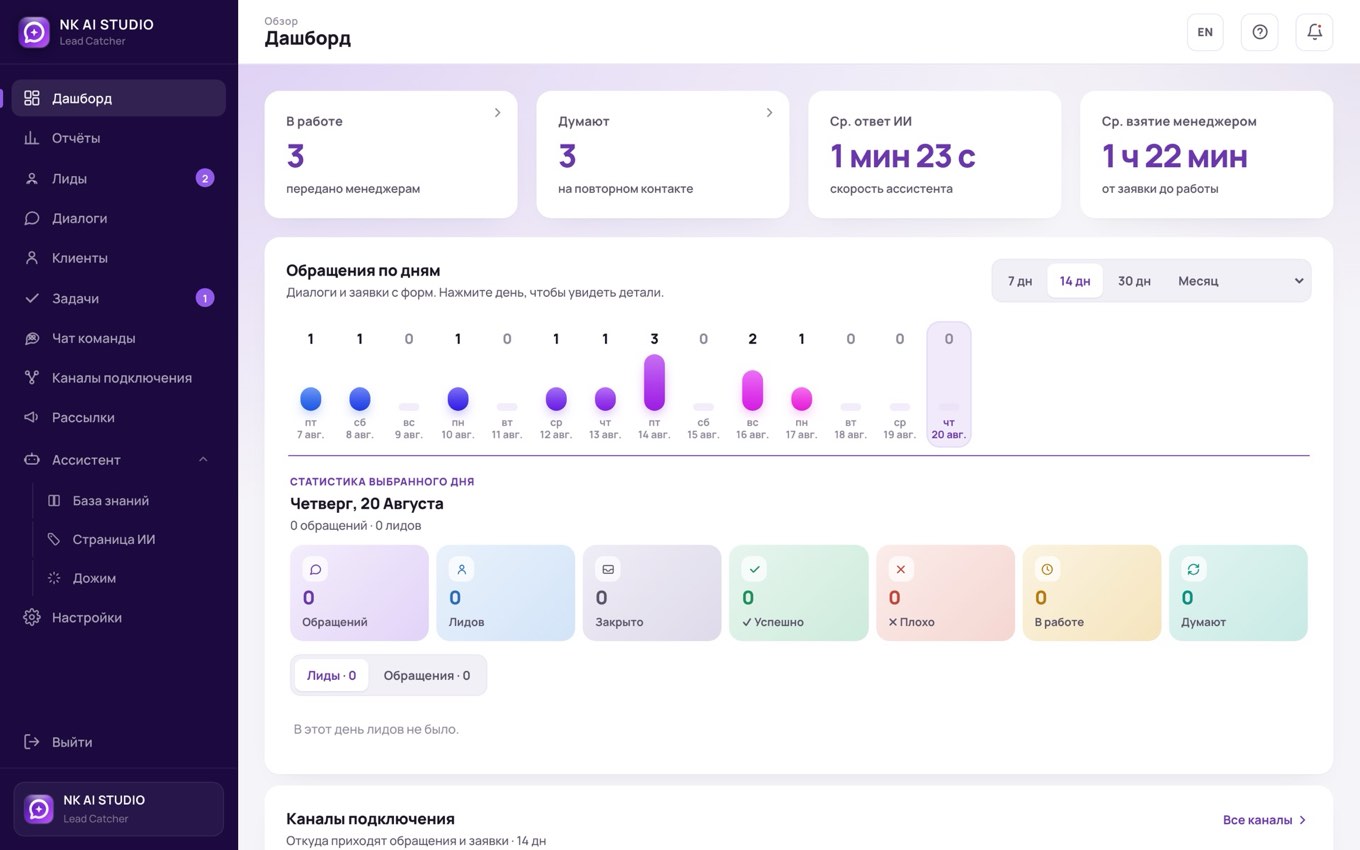
Three places where a lead disappears
The lead stays where it was seen
Instagram, WhatsApp, Telegram, email: four different windows and not one shared list. What arrives in the DMs usually never leaves the DMs.
A spreadsheet kept when someone feels like it
It gets filled in when there's time, and there usually isn't. A month later it holds half your clients, and it's no longer a working tool but an incomplete archive.
Nobody measures response time
One manager resolves a question in five minutes, another gets back a day later. Until the difference shows up in numbers, the delay looks normal.
What the CRM does every day
Channels are connected once
From then on, an enquiry from a form, messenger or ad lands in the shared list on its own. No more searching through chats or exporting from the ads account.
A kanban with your pipeline stages
Hot, warm, cold is just the starting set. You set up stages and statuses for your own process: your names, your order, as many steps as you need.
Client card with history
Messages, notes and agreements live in one place. A new employee picks up the context on a client in a minute, and the client doesn't have to tell their story twice.
Tasks and reminders
Every lead has an owner and a deadline, and each task is tied to a client. A promise to call back on Thursday no longer depends on someone's memory.
Reports and role-based access
You can see how many leads came in, how many were closed and how quickly each manager replies. Each employee has their own access and their own slice of data.
Team chat, mailings and knowledge base
Clients are discussed next to their card, not in private chats.
How it works for our clients
PlatinumMed
An education platform for aesthetic medicine: managers see their own enquiries, move each client through the stages and keep the history in one card.
Read the full caseThis is how work is set up in an education platform for cosmetologists: managers see their own leads, move each client through the stages and keep the history in the card.
This is what the workspace looks like
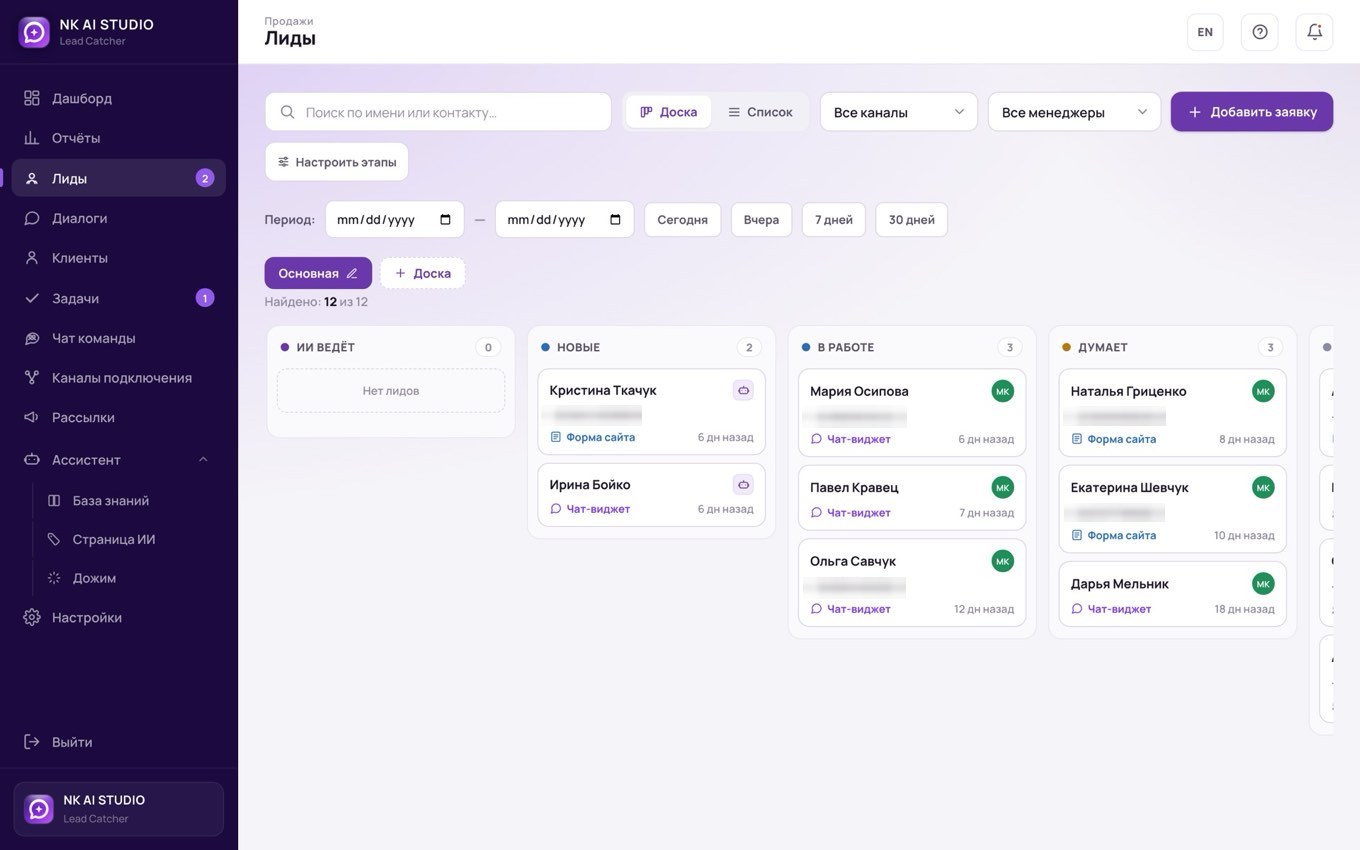
Every lead on a board, not lost in a chat thread
Every enquiry becomes a card on the board: new, in progress, considering, closed. You can see who owns the lead, which channel it came from and how long it has been waiting.
- Pipeline stages are yours to set up, to match the way you actually work
- Leads go to managers in turn; if nobody picks one up in time, it passes to the next
- Two views, board and list, with filters by channel, manager and period
What is happening right now
One screen instead of the morning stand-up: how many enquiries came in, how many became leads, who is working on what and how quickly people reply.
- Enquiries and leads by day, so strong days and slow days are easy to spot
- How quickly each manager picks up a lead
- Breakdown by channel: where your clients really come from
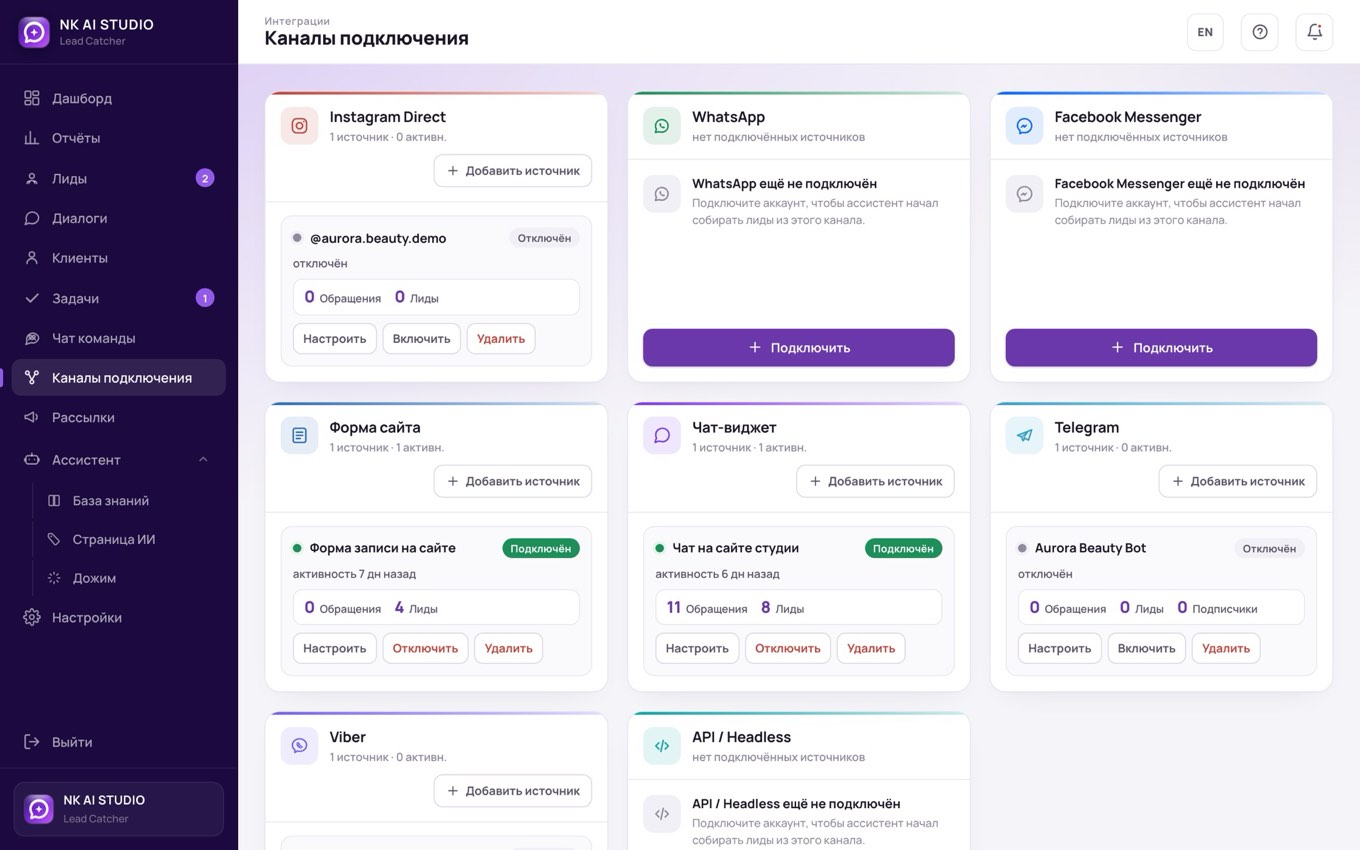
Eight channels, one workspace
Instagram, WhatsApp, Facebook Messenger, Telegram, Viber, a chat widget on your website, a website form and an open API. Enquiries from every source land in one list.
- We connect the channels together with you at launch
- For each channel you can see how many enquiries came in and how many became leads
- If a channel's access has expired, the system tells you rather than staying silent
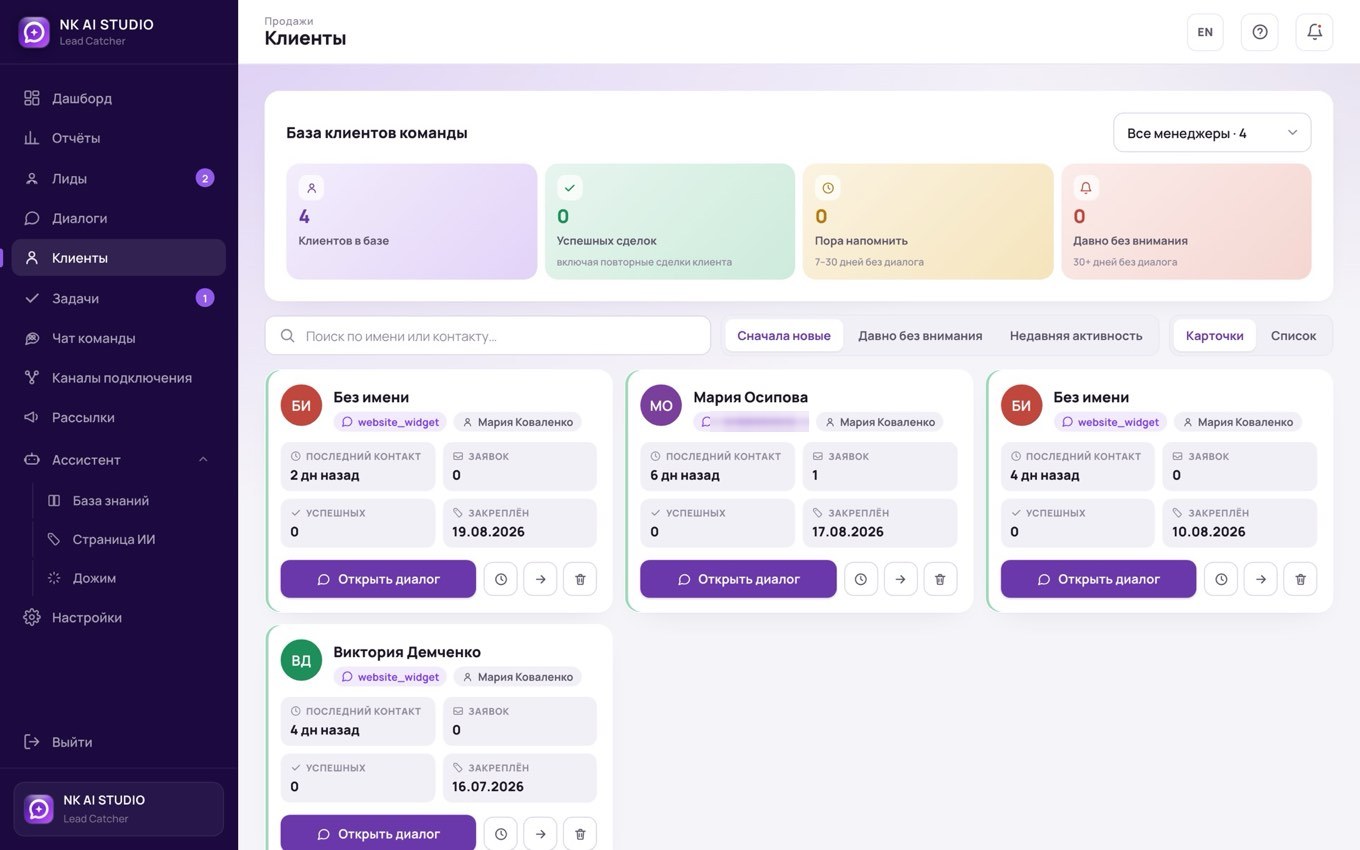
Each client stays with their own manager
Once a manager has taken a client through to a deal, that client is assigned to them. If the client gets in touch again, they go straight to their manager instead of the general queue.
- Client card: contact details, channel, history of enquiries
- Repeat enquiries are recognised automatically
- You can see how many clients each manager has
Tasks with watchers
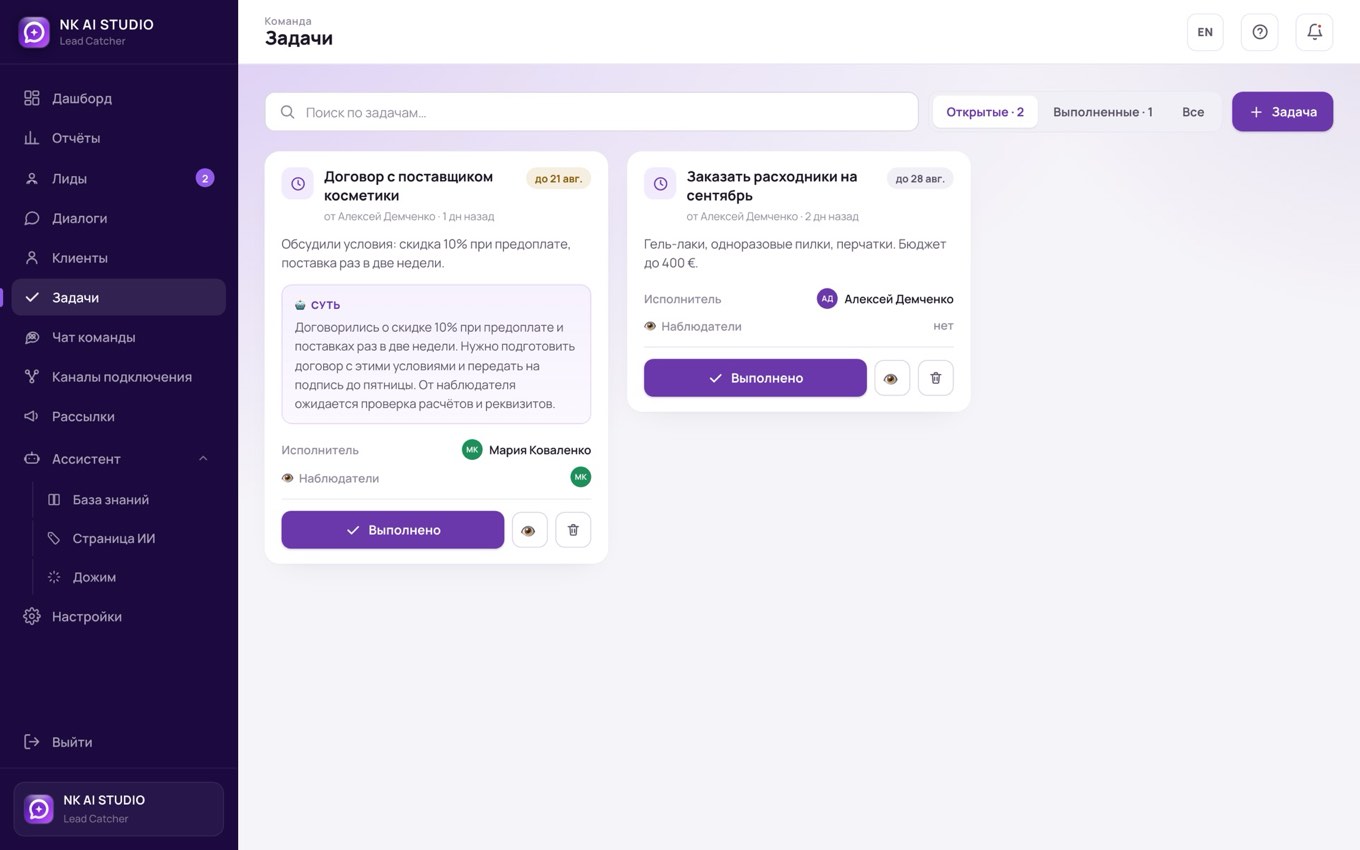
Anything that must not be forgotten goes into a task, with an owner, a deadline and the people who follow the result. A task can be created straight from a discussion in the team chat.
- Watchers get a notification
- A task can be created from a conversation
- A counter on the menu item shows when something new has appeared
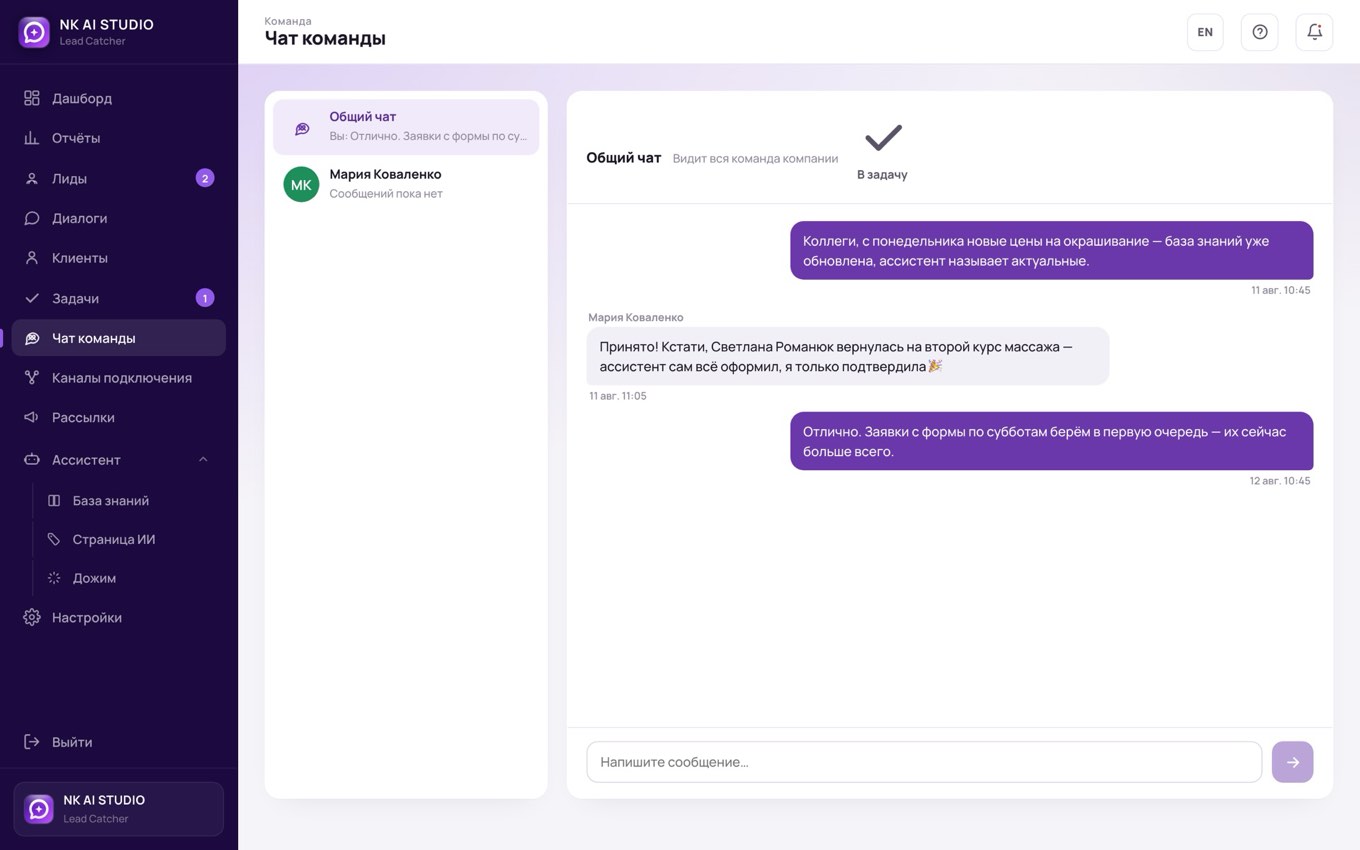
Team conversations stay inside the system
Direct messages, a company-wide chat and discussion of a specific lead. No need to move work conversations into personal messengers.
- A private conversation between two people is visible to no one else, not even the owner
- Discussions are tied to a lead, so it is clear which client is being talked about
- One click turns a discussion into a task
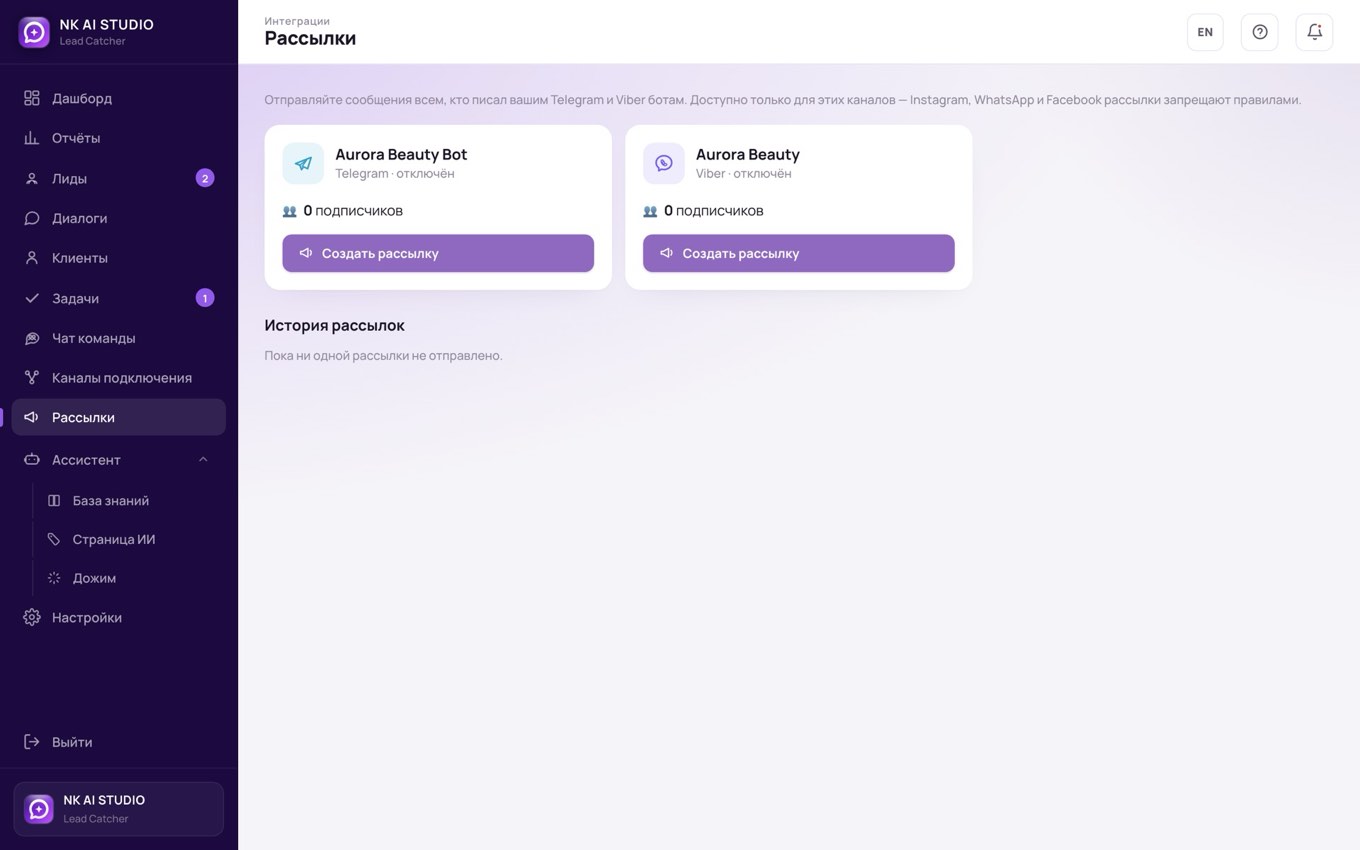
Message all your subscribers at once
A promotion, a new service, an appointment reminder: one message goes out to everyone who has written to your Telegram or Viber bot.
- Pick the bot, write the text, add a button; the exact number of recipients is shown before you send
- Anyone who has blocked the bot is excluded automatically
- Sending history: when, what and to how many people
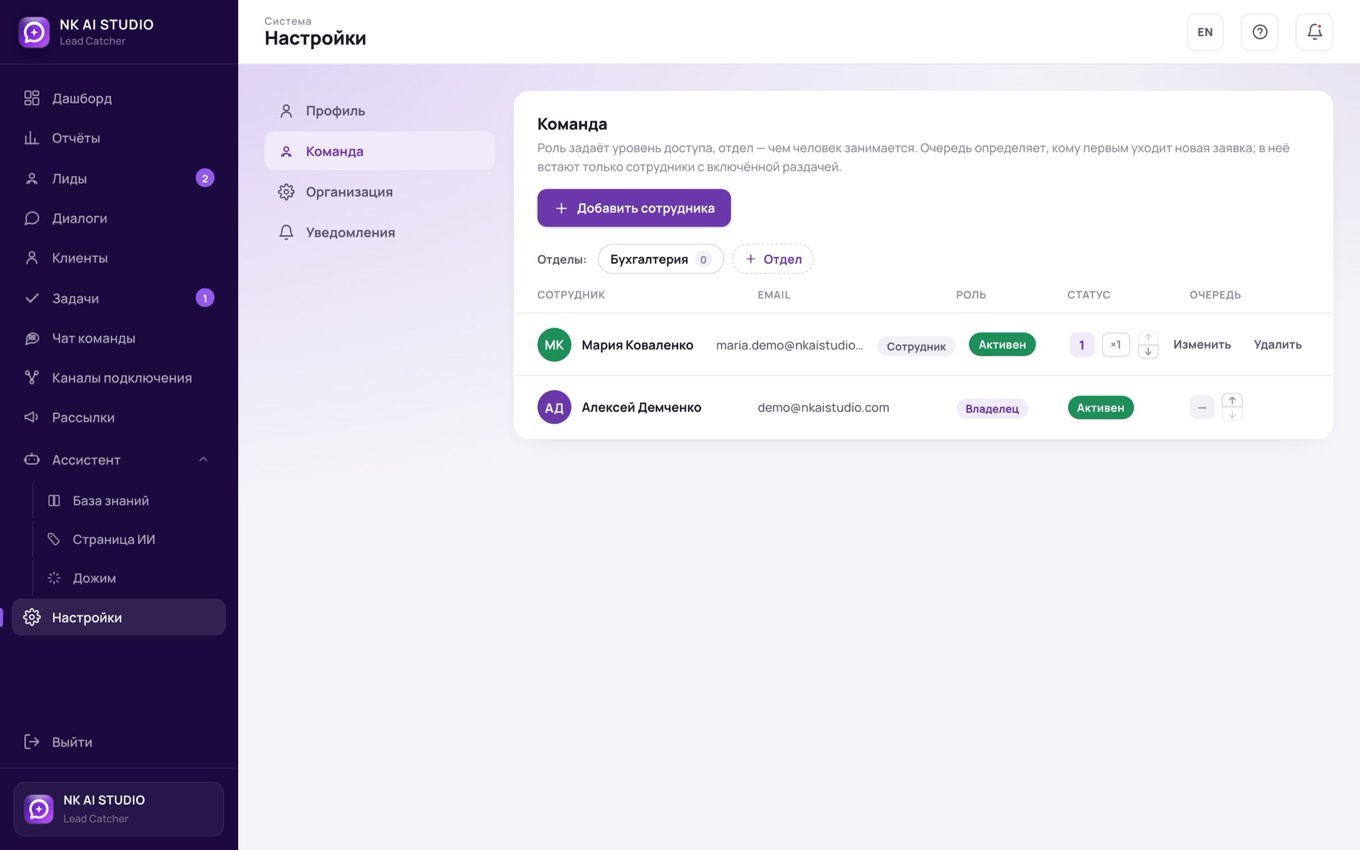
Departments, roles and the lead queue
Invite your staff, sort them into departments and decide who sees what. Leads are handed out in turn, fairly and predictably.
- Roles: owner, administrator, manager
- Each department has its own board, its own channels and its own set of screens
- Working hours: night-time leads are not lost, the clock starts in the morning
The price and one honest condition
Billed monthly. Setting up stages for your process, connecting channels, updates and support are included in the price.
Prices exclude VAT; +21 % for clients in Spain.
- Dashboard and a shared list of leads from all channels
- Lead kanban: hot, warm, cold
- Client card with enquiry history and notes
- Tasks, reminders and a team chat per client
- Channel connections and mailings to your database
- Reports on leads and managers' response times
- Knowledge base and role-based team access
- Data stored in the EU under GDPR, a separate database for your business
Our website is not required: the CRM connects to the forms on the site you already have. A new one is only needed if yours does not collect enquiries — then it is €490 (€390 together with the CRM or the AI agent) one-time, live in 7 days, with the timeline, price and support written on the page in advance.
How the setup works
Conversation
You show us where your enquiries come from and at which step they get stuck. We show you the system on a live example and tell you what the module will cover and what it won't.
Connecting the channels
We connect forms, the chat widget, lead capture and analytics to your website. If you have no site, or it does not collect enquiries, we build one in 7 days — that is a separate €490 (€390 together with the CRM or the AI agent).
CRM setup
We move your deal stages onto the kanban board, connect the channels, add your staff and assign access by role.
Working and adjusting
You manage clients in the system; we stay in touch and adjust stages, reminders and reports to how things actually go in practice.
What CRM pairs with
Website module
€490 one-offThe page that collects enquiries: forms, chat widget, lead capture, analytics, domain, mobile version. Live in 7 days. Needed only if you have no site of your own.
See the moduleAI agent module
€90/moReplies within seconds, around the clock, on Instagram, WhatsApp, Telegram, Viber, Messenger and on the website, in the customer's language. Qualifies the conversation and turns it into a structured lead that lands straight in the CRM.
See the moduleCRM is €100 a month, the AI agent another €90. The agent takes the first line, the CRM moves each lead through the stages, and your manager closes the warm ones.
Answers to common questions
The CRM connects to your website, so you don't necessarily need a new one. Leads from forms and messengers start landing in the system, and the site itself keeps working as before.
The one-time payment is the website, €490 (€390 together with the CRM or the AI agent). The CRM isn't a file, it's a running service: servers in the EU, data storage and protection, module updates and our support. As long as the system is receiving and tracking your leads, it costs money every month.
Yes. They are separate modules. The CRM collects and tracks leads; the AI agent is the first to reply to them. Start with one and add the other when it makes sense.
No. We move the stages you already work with onto the board. If the process changes, we change the stages, reminders and reports. That's configuration, not a rebuild.
On our servers in the European Union. Each business's data is isolated: your database is never mixed with other clients' databases, and staff at one company can't see another company's leads. Within your own team, you assign access yourself, by role.
The fewer leads you have, the more each lost one costs. You need a CRM when enquiries come from different places and you can no longer remember off the top of your head who hasn't had a reply. If we see on the call that it's too early for you, we'll say so.
We're a studio based in Spain and work across Europe online. Our projects run in several countries, and the map keeps growing. Everything happens online: calls, access setup, team training.